
Bridgeport GBT Bus Tracker
bigreniMaps & Navigation
3.845.00 Reviews
- Version
- 4.0
- Installs
- 10.00K
- Age Rating
- Everyone
Screenshots
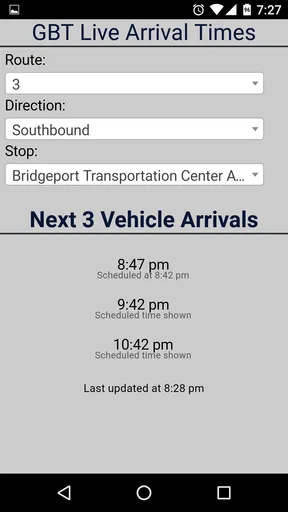
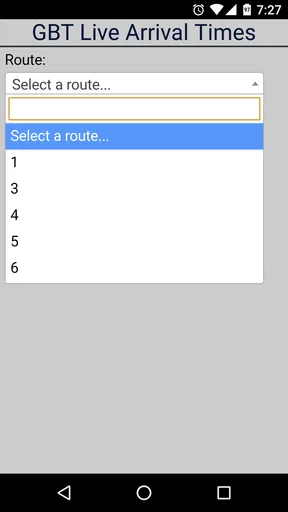
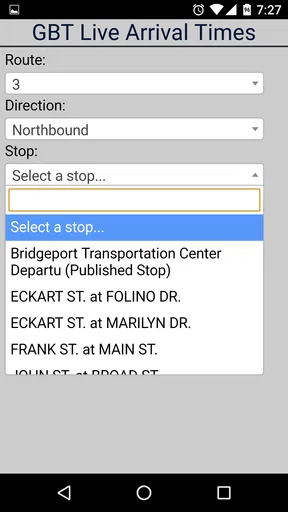
Our Review of Bridgeport GBT Bus Tracker
 Analysis by Appyee
When I need to catch a bus in Greater Bridgeport, I usually want one thing first: a quick answer about where the vehicle is, without opening a large, crowded transit platform. Bridgeport GBT Bus Tracker takes that focused approach. It is a lightweight maps and navigation app from bigreni, built around Greater Bridgeport Transit information rather than broad trip planning. After using it, I see the appeal clearly: it is a small, direct tool for riders who already know their route and mainly need help judging when to leave for the stop.
The app is free to download, which makes trying it low-risk. It is rated for Everyone and works on operating system version 11 or newer. Its current version is 4.0, and the project has been available since April 8, 2017. The listing shows a 3.8 average from around one hundred ratings, with over forty reviews and more than ten thousand installs. Those figures suggest a modest, local audience rather than a giant all-purpose navigation service, and that is important context when deciding what to expect.
How the tracker fits into an everyday bus trip
I find a local bus tracker most useful when it supports the whole decision to leave, not just a glance at a moving marker. In this section, I look at how I would fit the app into a familiar Greater Bridgeport trip, including the small timing choices that matter before reaching the stop. That routine also makes it easier to see where a focused tracker ends and broader trip planning begins.
A focused tool instead of a complete transit suite
I would not approach this as a replacement for every navigation app on my phone. Its purpose is narrower. The useful question is not “How do I travel across an unfamiliar city using every available transport option?” but “Can I check the GBT bus I am waiting for?” That distinction makes the app easier to understand and also explains its limitations.
Large map applications often combine driving directions, walking routes, trains, rideshare options, traffic layers, business listings, and many other details. That breadth is useful when I am planning a complicated journey, but it can also create extra taps when I am standing at a familiar stop. A dedicated Bridgeport tracker has a practical advantage in that situation: the local bus is the center of attention.
My preferred way to use it is before leaving home. I check the route information, compare the expected vehicle position with the time I need to arrive, and then decide whether I can finish breakfast, pack a bag, or leave immediately. The app is most valuable as a decision aid. It does not need to organize my entire day to save me from waiting unnecessarily at the curb.
A realistic morning scenario
Imagine I have an appointment in Bridgeport and already know which GBT line gets me close. I open the tracker while getting ready, look at the bus information, and use that view to estimate when I should walk to the stop. If the vehicle is still some distance away, I have a little flexibility. If it is approaching, I know that delaying for another coffee could mean missing it.
That workflow is especially helpful for riders who walk to a stop, because the important comparison is not simply the bus schedule. It is the relationship between the bus’s current position, my walking time, and the amount of time I need to wait safely at the stop. I would still leave a buffer for traffic, boarding, and imperfect arrival estimates, but the tracker gives me a more useful starting point than guessing from the clock alone.
There is also a useful habit for return trips. Rather than waiting until I am already outside, I can check the next ride while finishing an errand or leaving work. That makes the app more than a one-time morning check. It becomes a small part of the routine: confirm the route, judge the timing, and avoid turning a short wait into an unplanned long one.
What the local focus does well
The strongest part of this kind of app is its restraint. A rider who regularly uses Greater Bridgeport Transit may not need a nationwide transit directory. The local focus reduces the mental work involved in finding the relevant bus information. I can think about my trip rather than sorting through unrelated operators and transport modes.
That focus also makes the app easier to recommend to someone who already knows the local network. A student commuting to class, a worker traveling to the same workplace, or a resident making a regular appointment trip can build a simple checking routine without learning a complicated planning system. The value comes from repeated use, not from trying to cover every possible travel situation.
There is a trade-off, though. If I am visiting Greater Bridgeport for the first time, I may need more than a tracker. I might need walking directions to the stop, help selecting between routes, transfer guidance, or a broader view of nearby transport. In that case, a full navigation service can be the better first tool, while this app works as a companion once I know which bus I want.
Cost, purchases, and the meaning of free access
The basic price is free, so I can test the tracker without committing money up front. That matters for a local utility because my need may be occasional. Someone visiting the area for a weekend can install it, see whether it fits the trip, and remove it later without having paid an entry fee.
The listing also shows in-app purchases ranging from $0.99 to $9.99 per item. I would therefore treat the free download and paid extras as separate questions. Free access makes the initial decision easy, but I would review any purchase screen carefully before paying and ask whether the added value matches how often I ride. A person who takes GBT buses every day may judge an optional purchase differently from someone who needs one ride during a visit.
What I like about this cost structure is that it does not force a paid commitment simply to discover whether the local tracker is useful. What I would not do is assume that every capability is included forever just because installation costs nothing. The sensible approach is to use the free experience first, understand what it already handles, and only then consider whether an optional item solves a real problem in my routine.
Practical trade-offs before relying on it
The first limitation is scope. This is a Greater Bridgeport bus tracker, not a universal trip planner. If my journey includes several operators, a train connection, or a long walk through unfamiliar streets, I would keep a broader navigation app available. The focused design is a strength for local bus checking and a weakness for multi-stage travel.
The second limitation is that a live tracker can influence my timing without eliminating uncertainty. Even when a vehicle appears to be approaching, I would not treat that as a guarantee that I can arrive at the stop at the last possible second. Traffic, boarding delays, stop conditions, and changes in service can all affect a trip. My practical rule is to use the app to improve a decision, not to remove every safety margin.
The third trade-off concerns device compatibility. Because the app requires operating system version 11 or newer, an older phone may not be suitable. This is easy to overlook when an app is small and local. Before planning to depend on it, I would check the phone’s operating system and make sure the device can run the current version.
There is also a human factor: a tracker is most useful when I already know what I am looking for. If I do not recognize the route, stop, or direction of travel, the information may not be enough to make a confident plan. In that situation, I would first use a map or transit planner to learn the journey, then return to the tracker for timing.
Three habits that make the app more useful
I would check it at two points instead of only once: first while preparing to leave and again just before walking from the building. That reduces the chance of acting on an old view and gives me a better comparison between the bus location and my actual departure time.
I would pair the tracker with a deliberately conservative walking plan. If the stop is several minutes away, I would begin walking before the bus appears to be close. This turns the app into a timing aid rather than an excuse to rush across a street or leave a building at the last second.
I would keep a second navigation option for unfamiliar destinations. The tracker can help with the bus itself, while a general map handles the walk to the stop, the walk from the destination, and any transfer that falls outside the app’s local focus.
These habits reveal an important strength: the app can fit neatly into a larger travel routine without needing to replace every other tool. I do not have to choose between a dedicated local tracker and a general map for every trip. For regular GBT travel, the tracker can handle the part where timing matters most, while the broader app covers the surrounding details.
Who is likely to get the most value
I think the best audience is a regular Greater Bridgeport Transit rider who already knows the basic route. That person can benefit from a faster way to check the bus without turning every trip into a full route-planning exercise. The app is also a reasonable choice for occasional riders who want a lightweight local tool and are comfortable confirming the rest of the journey separately.
It may be particularly useful for people whose schedules have small but meaningful gaps. If I have to arrive at work on time, pick up a child, meet an appointment, or avoid standing outside longer than necessary, a current bus view can help me choose when to leave. The benefit is not glamorous, but it is practical: better timing can make a routine trip feel less uncertain.
Visitors can also find value if they already have the route details from a host, workplace, school, or another map. In that case, the tracker may be easier to use than a large app that keeps suggesting unrelated options. I would not make it my only travel tool on a first visit, but I could see using it once the local journey is understood.
Who should choose something else
I would skip this app as my main solution if I regularly travel beyond Greater Bridgeport or combine buses with several other services. A broad transit planner will likely be more convenient for comparing operators, planning transfers, and navigating unfamiliar streets. The local focus that helps a daily rider can feel restrictive when the trip keeps changing.
I would also look elsewhere if my phone runs an operating system older than version 11. There is little benefit in planning around an app that the device cannot support. Likewise, someone who wants one application to provide extensive walking guidance, multi-city coverage, and a complete itinerary may be happier with a larger navigation platform.
Finally, I would be cautious about paying for optional items unless I could identify a clear, repeated benefit. The free entry point is attractive, but the presence of purchases means the value decision should be based on actual use, not on the assumption that every extra is necessary. For occasional travel, free access may be enough; for frequent travel, the decision depends on what the paid option adds to that person’s routine.
My final recommendation for local bus riders
Bridgeport GBT Bus Tracker is a sensible niche app rather than a complete transportation command center. I like it because it stays close to a real everyday need: checking a Greater Bridgeport bus before I commit to the walk and the wait. Its free starting point makes experimentation easy, and its small, local purpose can be more convenient than a general navigation app when I already know my route.
I would recommend it to regular GBT riders, especially those who want a quick timing check and are using a compatible phone. I would install it alongside a broader map for unfamiliar destinations, transfers, and walking directions. That combination respects what this app does well instead of asking it to solve problems it was not designed to handle.
My verdict is therefore positive but specific: choose it for focused Greater Bridgeport bus tracking, not for complete trip planning. The 3.8 average reflects a useful but specialized tool, and my experience matches that description. If your daily travel centers on GBT, the app can earn a place in your routine. If your travel is regional, multi-operator, or highly unfamiliar, a more comprehensive alternative will probably deliver better value.
For me, the deciding question is simple: do I need a local bus position more often than I need a full route planner? If the answer is yes, this free app from bigreni is worth trying. If the answer is no, I would keep my existing navigation service and skip the extra installation.
Verdict
Strengths of Bridgeport GBT Bus Tracker
- Real-time bus locations help reduce uncertainty at stops.
- Useful route and schedule information for daily commuting.
- Simple interface makes essential transit details easy to find.
- Can help identify nearby stops and plan journeys more efficiently.
- Convenient for checking service updates while traveling around Bridgeport.
Limitations of Bridgeport GBT Bus Tracker
- Location accuracy may vary when buses have weak GPS signals.
- Arrival predictions can change quickly because of traffic conditions.
- Coverage is limited to Bridgeport GBT services and routes.
- The app may be less useful without mobile data or internet access.
- Some features may feel basic compared with larger transit platforms.
Similar Picks in This Category
View All
Uber - Request a ride
Uber Technologies, Inc.4.7


inDrive. Rides with fair fares
® SUOL INNOVATIONS LTD4.8

Yandex Go: Taxi Food Delivery
Mikromobilnost LLC Belgrade4.8

Bolt: Request a Ride
Bolt Technology4.8

Rapido: Bike-Taxi, Auto & Cabs
Rapido Bike Taxi4.8
Frequently Asked Questions
What is Bridgeport GBT Bus Tracker used for?
Bridgeport GBT Bus Tracker is designed to help passengers follow Greater Bridgeport Transit bus services in and around Bridgeport, Connecticut. After selecting a route, stop, or nearby location, you can view scheduled information and, when available, real-time vehicle positions or arrival predictions. It is particularly useful for checking a bus before leaving home and reducing uncertainty while waiting at a stop.
Does Bridgeport GBT Bus Tracker provide real-time bus arrival information?
The app may provide real-time arrival estimates and bus locations for participating Greater Bridgeport Transit routes, but accuracy can depend on GPS coverage, cellular connectivity, traffic, and the quality of data supplied by the transit system. Predictions should therefore be treated as estimates rather than guarantees. If live information is unavailable, the app may display scheduled times or a service-status message instead.
Can I use the app to find nearby stops and plan a trip?
Yes, Bridgeport GBT Bus Tracker is intended to make finding transit stops and checking route options easier. Depending on the available features and your device permissions, you may be able to search by route, stop name, or current location. It is still wise to confirm the direction, stop location, transfer details, and operating schedule before starting a time-sensitive journey.
Does Bridgeport GBT Bus Tracker require an internet connection or location access?
An internet or mobile-data connection is generally needed to download updated schedules, service alerts, arrival predictions, and vehicle-location information. Location permission may be requested for nearby-stop searches and location-based transit tools, although you can often search manually without sharing your position. Data usage, battery consumption, and permission behavior can vary according to how frequently you refresh the map.
Is Bridgeport GBT Bus Tracker free, and is it an official GBT application?
The app may be available to download without an upfront charge, but users should review the current store listing for advertising, in-app purchases, privacy details, and supported devices before installing it. Also check the publisher name carefully: an app that displays GBT information is not automatically an official Greater Bridgeport Transit product. Use official GBT channels to verify schedules, fares, alerts, and service changes.
